A merch program across many teams and locations runs most smoothly when one person owns the rules and everyone else orders within them. HR, marketing, sales, events and every site manager can still order their own merch. They order from one approved product list, against a budget they can see, with approval only on the orders that need it. This guide covers who should own what, example structures for companies with 5, 25 and 100 locations, illustrative budgets and approval policies, and a governance template you can download and fill in.
Why does merch get out of control in multi-team companies?
It usually happens because each team buys for its own needs. HR finds a vendor for welcome kits. Marketing finds another for event swag. Sales uses a gifting service. Each location manager knows a local printer. The program becomes fragmented gradually, through a series of reasonable individual purchases.
Over time, the company ends up with several vendors, no shared stock, no single spend number and no agreed version of the logo. Each order may be fine on its own, but together they produce inconsistent branding at inconsistent prices.
The underlying cause is that teams have different needs, timelines and approval chains. HR orders on the hiring plan. Marketing orders on the event calendar. Sales orders when a deal moves. Locations order when a shelf runs empty. A shared program has to support all four schedules in one system.
What does fragmented merch ordering cost?
- Price: Three teams ordering the same hoodie from three vendors each pay a small-order price. Combined, they would have reached a better price break.
- Brand: Every new vendor is a new chance for the logo to be redrawn, recolored or stretched. A local printer adjusts the file to suit the machine, not the brand standard.
- Visibility: Nobody can say what the company spends on merch in a year until finance adds up invoices after the fact.
- Stock: Leftover event stock sits in a closet at one site while another site places a new order for the same item.
- Continuity: The program depends on one person's inbox. When they leave, the vendor contacts, logo files and order history leave with them.
The most visible cost is inconsistent quality. A new hire gets a good hoodie in a welcome kit, then gets a thinner version of the same hoodie at a company event. For the brand side of this, read what a good merch program is worth.

Should merch be centralized or run by each team?
Most larger companies settle on central rules with local ordering rather than either extreme.
Full centralization, where one person places every order, works for a small company. At fifty orders a month, that person cannot keep up, and teams start buying through other channels. Full decentralization is what most companies already have, and it produces the costs above.
A common model splits the work three ways:
- The center owns: the platform, the approved product list, logo files and brand rules, supplier relationships, central stock and reporting.
- Teams and locations own: what they order from the approved list, when they order it, and how they spend their budget.
- Finance owns: budget totals, approval thresholds for large orders, and payment terms.
Marketing should not need permission to order event shirts. It should need to order them from the approved list, through the shared system, against its own budget. The same rule applies to a site manager in Denver and an HR coordinator in London.
Who should own, order and approve merch?
Define five roles before choosing products. Unclear ownership causes more program problems than product choice does.
| Role | Usually held by | What they do |
|---|---|---|
| Program owner | Brand, marketing operations or procurement lead | Owns the approved list, brand rules, supplier relationships and reporting. Approves new products. |
| Budget owner | Department head or regional manager | Holds a budget for a team, location or region. Approves orders that go over it. |
| Buyer | Site manager, HR coordinator, event lead | Places orders from the approved list for their team or location. |
| Finance or AP approver | Accounts payable or a finance partner | Approves orders above a set value. Manages invoices and payment terms. |
| Brand reviewer | Brand or creative team | Signs off artwork and proofs for anything new or custom. |
One person can hold several roles in a small company. In a large one, name a backup for every approver. If only one person can approve, orders wait whenever that person is away.
In MerchOS, owners and managers see the whole account. On Enterprise, buyers see the collections, logos, designs and shipping addresses shared with their group, and order from those.
How should merch work at 5, 25 and 100 locations?
The structure changes with size. The three examples below are illustrative. They show common patterns, not rules, so adjust them to your company.
5 locations: one owner, one store, light approvals
- Who orders: One office or site manager per location, plus HR and marketing at head office.
- Who approves: The program owner approves anything over budget. Finance reviews a monthly spend report.
- Budgets: One annual budget per location. Head office teams share a central budget.
- Stock: Central stock for core items such as tees, hoodies, drinkware and welcome kit contents. Each location keeps a small shelf for walk-in needs.
- Storefront: One company store. Every location orders from the same catalog, with a spend limit for each shopper.
25 locations: regional budget owners and central stock
- Who orders: Each location manager, plus central HR, marketing and events.
- Who approves: Regional managers approve orders above a set value for their region. Finance approves very large orders. The program owner approves anything not on the approved list.
- Budgets: Per location, set by headcount or customer traffic, rolled up by region. Quarterly periods show overspend early.
- Stock: Central stock in a warehouse for everything ordered more than a few times a year. Locations reorder from stock instead of placing new production orders.
- Storefront: One store for every location is usually enough. Add a second store only for a different audience, such as customers or partners.
100 locations: groups, tiered thresholds and scheduled reviews
- Who orders: Location managers order routine items. A central team runs launches, seasonal refreshes and welcome kits.
- Who approves: No approval below a threshold, the regional manager above it, and finance above a higher one. Every approver has a named backup.
- Budgets: Per location or region, with the period starting in the same month as the fiscal year. Spend is reviewed monthly by region and quarterly with leadership.
- Stock: Central stock for every core item, with reorder points. Kits are packed centrally and shipped to sites or to individuals.
- Storefront: One store per audience: employees, franchisees or partners, customers. On Enterprise, locations order routine items through the team account, where each location is a group with its own budget. Welcome kits fire from your HRIS when a new hire starts, so onboarding needs no order at all.
| 5 locations | 25 locations | 100 locations | |
|---|---|---|---|
| Program owner | Part of one person's role | One dedicated person | A small central team |
| Who orders | Site managers and head office | Location managers and central teams | Location managers for routine items, central team for launches |
| Approvals | Over budget only | Over budget, plus a regional threshold | Tiered: none, regional, finance |
| Budget period | Annual | Quarterly | Quarterly, on the fiscal calendar |
| Stock | Central core items, small local shelf | Central warehouse | Central warehouse with reorder points and central kitting |
| Storefronts | One store | One store for all locations | One store per audience |
Changent runs this pattern across 280 partner organizations: one catalog, budget caps applied at checkout and stock held in one stockroom. The Changent case study shows how it works in practice.
How do you set merch budgets by location and department?
Tie each budget to whatever drives demand, then show the remaining balance to the person spending it.
- HR: Planned hires times the cost per welcome kit, plus a reserve for anniversaries.
- Marketing and events: The event calendar, with a line for each event.
- Sales: Target accounts and deal stages, if sales sends gifts.
- Locations: Headcount, or customer traffic for retail and hospitality sites.
Here is an illustrative annual budget for a company with 25 locations. Every figure is a placeholder.
| Budget line | Basis | Illustrative annual budget |
|---|---|---|
| Each location (25) | About 40 staff: uniforms and team gear | $3,000 each, $75,000 in total |
| HR welcome kits | 300 hires at $90 per kit | $27,000 |
| Marketing and events | 12 events at $2,500 each | $30,000 |
| Sales gifting | 150 accounts at $120 each | $18,000 |
| Program reserve | New products, reprints, rush orders | $15,000 |
| Total | $165,000 |
Use your own headcount, hiring plan and event calendar. Quarterly budgets catch overspend sooner than annual ones. Start the period in your fiscal month, not January, or the numbers will disagree with finance from the first month.
On the Enterprise plan, MerchOS lets a company organize its account into groups and name them for how it works: locations, regions, brands or departments. Each group can carry an annual or quarterly spend budget that starts in your fiscal month, and members see how much is left. A team order that would take a group over its budget is held for approval instead of going straight through. For sales gifting, gift links let each recipient confirm or choose their items and enter their own size and address.
What approval thresholds work for merch orders?
Require approval only for exceptions. If every order needs a signature, teams are more likely to order outside the system when an event order is delayed.
An illustrative approval policy:
| Situation | Who approves | Target response |
|---|---|---|
| On the approved list, within budget, under $1,000 | No approval. Ships as ordered. | None needed |
| Within budget, $1,000 to $4,999 | Budget owner | 1 business day |
| $5,000 or more | Budget owner, then finance or AP | 2 business days |
| Would take the location over budget | Budget owner | 1 business day |
| New product not on the approved list | Program owner, plus brand review of the proof | 3 business days |
| Custom artwork or a new logo treatment | Brand reviewer signs the proof | Before production |
These numbers are illustrative. A 5-location company might approve only over-budget orders. A 100-location company might add a tier above $25,000. The aim is that most routine orders need no approval at all.
Set a response target for each tier and name a backup approver. A delayed approval often costs more than a slightly less strict policy.
MerchOS supports approval in three places:
- Accounts payable: Invoice orders, and card or ACH orders if you choose, go to your AP approvers above an order value you set.
- Storefronts: A company-paid store can send every order, or only orders above a set amount, to a manager first. By default, an order with no response is approved automatically after 48 hours. A store can switch that off and hold orders until a manager decides.
- Group budgets: On Enterprise, a team order that would take a group over its budget is held for approval.

Should each location get its own storefront?
Usually not. For most companies, one store per audience is easier to run than one store per location.
- One store for every location: One catalog to maintain, one set of brand rules, one place to report from. Give each shopper a spend limit. Best when locations need roughly the same products.
- One store per location: Each site gets its own catalog and settings. Worth it when locations sell to the public, carry different products, or are run by franchisees or partners who pay for their own orders.
- One store per audience: Employees, customers, partners and event attendees need different products, prices and payment rules. Separate by audience first and by location second.
A Brandmerch company store serves people who pick their own items, such as employees, customers or partners. It can be company-paid, where staff order covered items at no cost to them, or paid by the shopper. Each shopper can have a spend limit, which works as an employee merch allowance. Storefronts come with the Business plan, from $199 per month billed annually.
Budgets for each location work differently. On Enterprise, MerchOS holds location budgets on groups. Location buyers order through the team account from the collections shared with their group, and the group budget applies to those orders.
Should you keep merch stock centrally or at each location?
Keep core items in central stock and let locations reorder from it. Hold local stock only for items needed the same day.
- Central stock: Anything ordered several times a year, welcome kit contents, uniforms in standard sizes and event basics.
- Local stock: A small shelf of tees or giveaways for walk-ins, and anything expensive to ship one at a time.
- Order to need: One-off event items, personalized gifts and anything with a short shelf life.
Set a reorder point for every central item so it is reordered before it runs out. The formula is average weekly use times production lead time in weeks, plus safety stock. An item that ships 40 units a week, with a 3-week lead time and 60 units of safety stock, should be reordered at 180 units. The template below does this calculation for you.
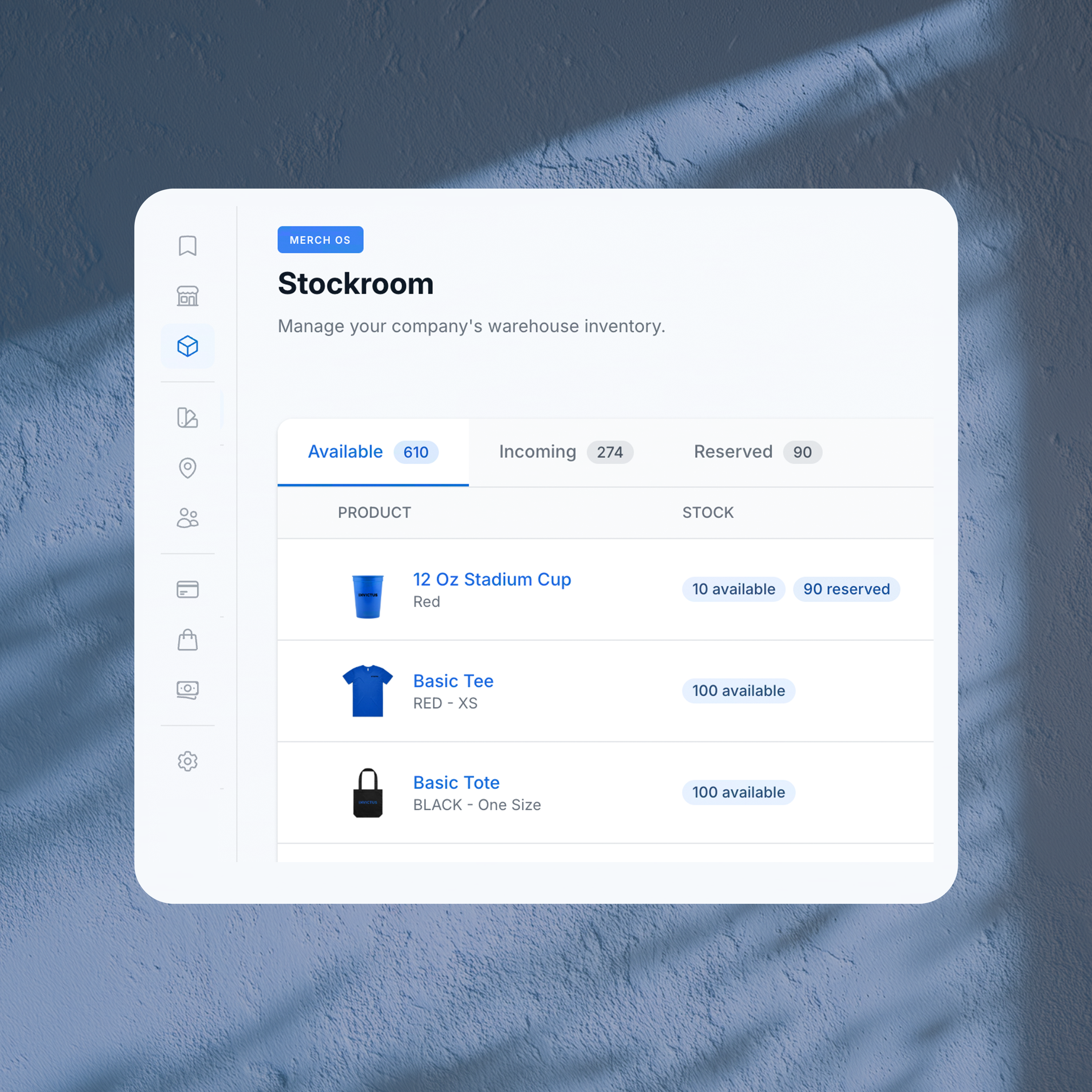
Brandmerch is a marketplace and a 3PL. It holds client stock in its warehouse, packs kits and ships them. In MerchOS, the stockroom shows what is available, incoming and reserved, and teams ship from it to a location, an event or a person. See fulfillment and storage and the merch fulfillment guide for the detail.
How do you keep the brand consistent across every location?
Lock the approved artwork in one place and let people order only from an approved product list.
- Approved product list: Three to five options in each category: apparel, drinkware, bags, desk items and premium gifts. Each item has an approved color, logo version and decoration method.
- Logo rules: Which logo version goes on which product color, minimum sizes for embroidery and print, and what is never allowed: stretching, recoloring, outlines and effects.
- Proof sign-off: Anything new gets an approved proof before production. Correcting an error on a proof costs far less than reprinting a full production run.
- Quarterly review: Add what teams ask for. Retire what draws complaints, sits in stock or costs too much.
In MerchOS, logos live in a shared brand library, and collections of approved products can be shared with specific groups, so each location sees the products and logos meant for it. Every order uses those approved files, and you approve a proof before production. The catalog covers 575 brands, and orders ship to 220 countries.
What should you report on, and how often?
- Spend by location, team and person: Monthly. Shows who is ahead of plan and who has not ordered at all.
- Budget used against time elapsed: Monthly. A location that has used 70% of its annual budget halfway through the year should be reviewed with its budget owner.
- Top items and reorder frequency: Quarterly. Feeds the approved list review and the reorder points.
- Stock on hand and slow movers: Quarterly. Anything untouched for two quarters should be moved to a location that uses it, or retired.
- Approval times: Quarterly. If approvals regularly miss their target, the thresholds are too low or an approver is missing.
Hold a short quarterly review with each budget owner. Use it to combine orders. If HR and marketing both order the same hoodie, one larger order is cheaper for both.
The Spend page in MerchOS shows total spend, orders, average order value and units over 6, 12 or 24 months, with a list of top spenders and, on Enterprise, a breakdown by group.
How do you move every team onto one program?
One team at a time, starting with the team that orders most predictably.
- Audit. List every team and location that orders merch, their vendors and last year's spend. Accounts payable records are the fastest source.
- Agree the rules. Roles, budgets, thresholds and the first approved product list. The template below has a tab for each.
- Start with one team. HR is usually the right first team. Welcome kits follow the hiring plan, so volume is predictable and results are easy to see.
- Run in parallel for one quarter. Keep the old vendor available until the new process has handled a full quarter for that team.
- Move the next team. Marketing and events next, then sales, then locations region by region.
- Close the old routes. Once a team has moved, finance stops approving merch invoices from outside the program.
Merch governance checklist and template
Download the merch governance template (Excel). It has a read-me tab and six working tabs: roles and approvers, budget by location or department, approval thresholds, approved product list, brand rules and reorder points. The example rows are illustrative and marked so you can replace them.
- Name a program owner and a backup.
- List every buyer, budget owner, finance approver and brand reviewer. Give each approver a backup.
- Set a budget for every location and department, on your fiscal calendar.
- Set approval thresholds and a response time for each tier.
- Build the approved product list: three to five items per category, with approved colors, logo versions and decoration methods.
- Write the brand rules for merchandise and keep the logo files in one place.
- Decide what is held centrally, set a reorder point for each item and name who reorders.
- Choose one store for every location, or one store per audience.
- Review spend monthly and the approved list quarterly.
- Move one team at a time, and close the old routes behind it.
MerchOS puts this structure in one account: storefronts, approvals, the stockroom and gift links, plus group budgets on Enterprise, with Brandmerch's warehouse packing and shipping. See how MerchOS works, the enterprise solution and pricing. The Procurement plan starts at $19.99 per month, the Business plan with storefronts starts at $199 per month billed annually, and Enterprise is priced to your program. For related playbooks, read the enterprise swag program guide. Or talk to us about the structure that fits your locations.